The Best Ultrabooks and Premium Laptops of 2025: Top Picks for Performance and Portability
Finding the right ultrabook or premium laptop in 2025 can feel overwhelming, especially with constant hardware updates and new AI-focused features entering the market. Whether you’re upgrading your daily work machine, looking for a reliable device for travel, or need strong performance for multitasking and creative workloads, today’s top models deliver impressive power in thin, lightweight designs.
This guide highlights the best ultrabooks and premium laptops of 2025, chosen for their balance of performance, portability, battery life, and long-term usability. Each device on this list has been evaluated for real-world strengths — not just benchmark numbers — so you can understand how they actually feel to use. We focus on display quality, build materials, thermal behavior, port selection, and overall user experience to help you quickly narrow down your choices.
Whether you prefer Windows, macOS, or need a machine optimized for AI-powered workflows, the recommendations in this guide offer something for every type of user. From all-day battery champions to compact powerhouses and polished business machines, these are the laptops that stand out in 2025 for reliability, capability, and everyday comfort.
Our Selection Criteria and Why You Can Trust It
To create this guide, I conducted a deep dive into the latest ultrabooks and premium laptops, analyzing multiple highly-rated experts’ websites and trusted review platforms. The goal was to identify models that consistently deliver in real-world use, not just on paper.
Our Selection Process
Our selection process focused on four key criteria: performance, build quality, usability, and value.
-
Performance: We prioritized laptops that deliver consistent, real-world speed for productivity, multitasking, and creative workloads.
-
Build Quality: Durability, material quality, and thermal management were considered to ensure the laptops last and remain comfortable under extended use.
-
Usability: Keyboards, displays, port selection, and battery life were evaluated to guarantee a smooth day-to-day experience.
-
Value: Each laptop was assessed for its balance of features, reliability, and price, ensuring readers get the most practical benefits for their investment.
We deeply researched this topic, consulting several highly-rated experts’ websites, reading detailed reviews, and analyzing benchmarks. By combining professional insights with real-world user feedback, we ensured that every product included on this list meets high standards for quality, performance, and dependability.
Overviews
MacBook Air (M4)


This is probably the best “everyday” ultrabook for most people in 2025. It combines Apple’s efficient M4 chip with a very light, silent design (fanless), long battery life, and very good build quality. According to Tom’s Hardware, the 15-inch model lasted over 15 hours in their tests. The webcam has been upgraded to 12 MP, and you get support for two external displays when the lid is open.
Pros
-
Excellent battery life for its class
-
Lightweight and silent (no fan)
-
Strong performance for productivity tasks
-
Good build quality and reliability
Cons
-
RAM and SSD upgrades are expensive
-
The display notch is still there (no Face ID)
-
Under very heavy workloads (e.g., rendering) it can thermal-throttle given the fanless design
Lenovo Yoga 9i 2-in-1 (Aura Edition)
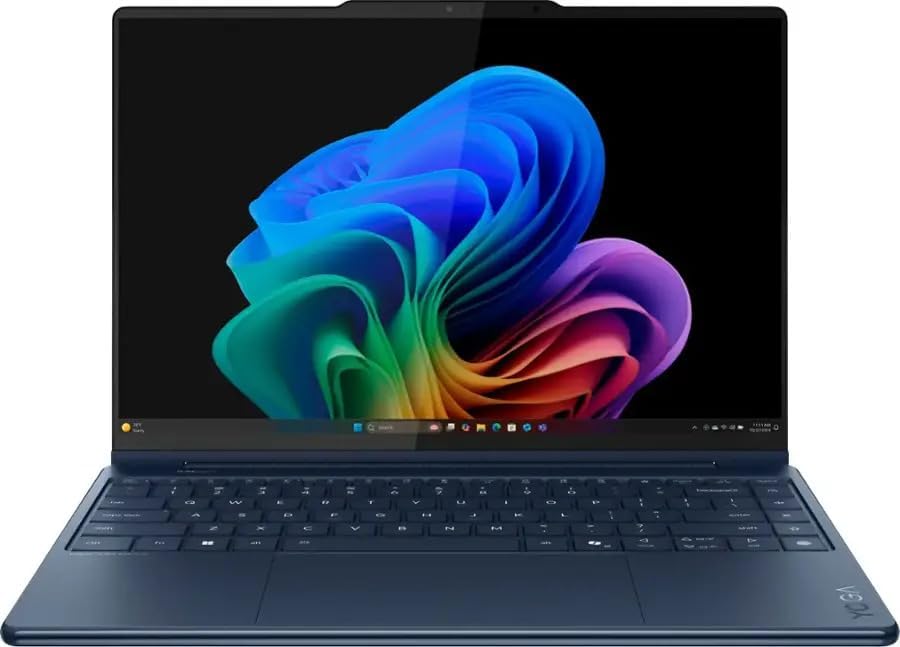
This is a premium convertible ultrabook: powerful, flexible, and stylish. Tom’s Hardware calls it the best 2-in-1, thanks to its 14-inch OLED touchscreen (2880×1800, 120 Hz) and solid build. It’s well-suited for creative tasks, note-taking, media consumption, or even light content creation, while still being compact and portable.
Pros
-
Gorgeous OLED touchscreen with smooth refresh rate
-
Long battery life for a Windows 2-in-1
-
Strong build quality
-
Good webcam
Cons
-
Comes with a fair amount of bloatware
-
Harder to repair / upgrade (convertibles often are)
-
OLED can consume more power under certain workloads
Lenovo ThinkPad T14s (Gen 6, Snapdragon / Arm)

This ultrabook is all about efficiency and battery life. With a Snapdragon X Elite processor, it’s extremely power-efficient, offering what Tom’s Hardware measured as 21 hours of battery life. It’s lightweight (around 1.19 kg) and comes with the exceptional ThinkPad keyboard, which is a strong selling point for productivity users.
Pros
-
Exceptional battery life (ideal for travel or long work days)
-
Excellent keyboard and build quality, per ThinkPad tradition
-
Bright IPS display
-
Very portable
Cons
-
Price is high for what you get
-
SSD is slower compared to competitor ultrabooks
-
Some software compatibility issues: Windows on Arm isn’t fully mature for all applications
HP OmniBook Ultra

A newer, premium ultraportable from HP, the OmniBook Ultra packs serious power into a slim design. Using an AMD Ryzen AI 9 HX 375 chip, it delivers strong productivity performance. According to Tom’s Hardware, it runs for about 12 hours 52 minutes in their battery test. It’s a great pick if you want Windows, performance, and a modern design.
Pros
-
Very strong CPU performance for productivity tasks
-
Sleek, modern chassis
-
Competitive battery life for a powerful machine
-
Rare to see Thunderbolt 4 on AMD systems — gives good connectivity options
Cons
-
Comes with too much bloatware by default
-
Some complained about the USB-A port placement or usability (“fussy USB-A port”)
-
The high-performance chip may generate more heat under load
Dell 14 Plus (DB14250)

The Dell 14 Plus is a compact productivity laptop with strong performance, plenty of memory, and a sharp 2.5K display. The Intel Ultra 7-258V chip with its built-in NPU makes it ready for modern AI features, and the 32GB RAM + 1TB SSD combination delivers fast multitasking and responsiveness. Port selection is excellent, and the build is solid.
Pros
-
Fast performance with Intel Ultra 7 and strong AI/NPU capability
-
32GB LPDDR5X RAM and 1TB SSD is ideal for multitasking
-
Excellent ports: USB-A, USB-C, Thunderbolt 4, HDMI
-
Sharp 14″ 2.5K 16:10 display
-
Good battery life and compact form factor
Cons
-
Screen is only 300 nits (not great outdoors)
-
RAM is not upgradeable
-
Can run warm under load
-
Occasional coil whine and audio issues reported
Sources
▮ https://www.cnet.com/tech/computing/best-laptop/ ▮ https://www.pcmag.com/picks/the-best-ultraportable-laptops ▮ https://www.lenovo.com/us/en/search?text=exploring-the-best-ultrabooks-for-2025-features-workloads-and-faqs&rows=20&sort=relevance&display_tab=Contents ▮ https://www.tomshardware.com/best-picks/best-ultrabooks-premium-laptops ▮ https://www.ultrabookreview.com/251-best-ultrabooks/ ▮ https://www.pcworld.com/article/436674/best-pc-laptops.html ▮ https://www.laptopmag.com/best-ultrabooks-1—