The Best USB Hubs of 2025: Powered, Portable, and USB‑C Solutions
In today’s digital world, having the right USB hub can transform how you connect your devices. Whether you need to expand a laptop’s limited ports, connect multiple peripherals, charge devices simultaneously, or attach external displays, a high-quality USB hub simplifies your workflow and keeps your setup organized. With options ranging from compact portable hubs to powerful desktop models, there’s a solution for every need.
This guide highlights the best USB hubs across three categories: powered hubs for high-performance charging and multiple devices, portable hubs for on-the-go convenience, and USB‑C hubs for modern laptops and ultrabooks. We carefully researched expert reviews, user feedback, and product specifications from leading technology publications to identify hubs that combine reliability, performance, and versatility.
Whether you’re a student, professional, or content creator, these hubs help you expand connectivity without compromising speed or power. From connecting monitors and storage devices to charging smartphones and tablets simultaneously, the hubs featured here deliver the features that matter most. This guide will help you choose a USB hub that meets your setup requirements and enhances your productivity.
How We Chose These USB Hubs
Selecting the best USB hubs required careful research and analysis. We deeply examined multiple highly-rated experts’ websites, professional reviews, and real-world user feedback to identify hubs that consistently deliver strong performance, reliability, and versatility.
Our selection criteria focused on four key areas:
- Connectivity and Performance We prioritized hubs that maintain fast, stable data transfer speeds, support high-resolution displays, and allow multiple devices to function simultaneously without interference.
- Power Delivery and Charging For powered hubs, we evaluated their ability to charge laptops, tablets, and smartphones safely and efficiently while in use.
- Build Quality and Portability Durable materials, compact design, and practical form factors were considered to ensure hubs last and are convenient to carry for mobile setups.
- Versatility and Compatibility We selected hubs that work with a wide range of devices, including MacBooks, Windows laptops, and USB-C enabled devices, while offering a mix of USB-A, USB-C, HDMI, and SD card options.
By combining expert insights with detailed research, this guide provides a curated list of USB hubs you can trust to meet your connectivity and productivity needs.
Overviews
Sabrent HB-B7C3 10‑Port Powered USB 3.0 Hub


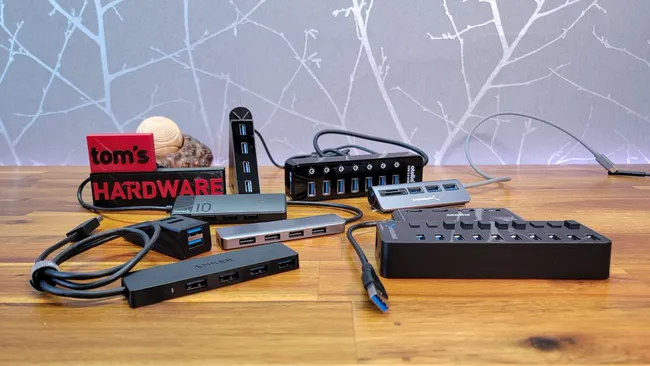
This is a heavy-duty, desktop‑style hub with ten USB‑A ports—seven for data and three dedicated charging ports. It’s ideal if you need to plug in many wired devices or charge multiple accessories at once. Tom’s Hardware tested it and found the data ports reliably hit full USB‑3 speeds, and each port has its own power switch for control.
Pros
-
Very high port count for both data and charging
-
Each port has an individual on/off switch
-
Delivers consistent 5 Gbps data speeds even under load
Cons
-
Requires a bulky external power adapter
-
Not very portable due to its size
-
The upstream cable could be longer for some setups
Anker 7‑in‑2 USB‑C Hub for MacBook

A compact, durable hub designed for MacBooks, expanding two USB‑C/Thunderbolt ports into 7 options: USB‑C, 2 USB‑A, 4K HDMI, SD, and microSD. Supports up to 100 W pass-through charging and 4K@60 Hz output. Ideal for connecting peripherals and external displays on the go.
Pros
-
100 W pass-through charging
-
High-speed data transfers up to 40 Gbps
-
4K HDMI and SD/microSD slots
-
Compact, premium aluminum build
Cons
-
Mac-specific; limited compatibility with other devices
-
Can get warm under heavy use
-
No Ethernet port
-
M1/M2 MacBooks cannot run two external displays simultaneously
Sabrent HB-U3CR 4‑Port USB‑C Hub

If you just need a reliable, portable hub for adding a few USB‑A connections to a USB‑C-only device, this is a solid pick. It’s compact, has three USB-A ports plus an SD/microSD card reader, and features a magnetic base so it can stay put on your desk. Tom’s Hardware named it “best affordable USB‑C hub for MacBooks.”
Pros
-
Lightweight, portable, and easy to carry
-
Magnetic base helps with desktop stability
-
Aluminum chassis feels premium
Cons
-
Maximum speed is limited to 5 Gbps
-
Upstream cable is shorter than ideal for some setups
-
No dedicated power — relies on host device
UGREEN Revodok 105 (5‑in‑1) USB‑C Hub

Highlighted by Wirecutter in their 2025 list of top USB‑C hubs, this adapter offers HDMI (4K), three USB-A data ports, one USB-C, and supports up to 100W of power delivery. It’s a versatile all-rounder for work, media, and peripheral expansion without taking up much space
Pros
-
Good mix of ports for most use cases (USB-A, HDMI, USB-C)
-
High power pass-through supports charging most laptops
-
Solid, compact build quality
Cons
-
Doesn’t support ultra‑high data speeds on all ports
-
HDMI output is limited to a single screen
-
No Ethernet or SD card reader
i-tec 7-Port Metal USB‑C Charging Hub

This is a more power-focused hub: it gives you seven USB-A 3.0 ports and can deliver up to 60W of power back to your laptop via USB-C. This makes it ideal for desktops, workstations, or “hub-heavy” setups. The metal casing helps with heat dissipation.
Pros
-
High-powered charging and data simultaneously
-
Seven ports accommodate a variety of USB-A peripherals
-
Premium metal design with effective heat management
Cons
-
Requires a strong USB-C charger (85–100W recommended)
-
Larger and heavier than unpowered hubs
-
Without power input, charging capability drops
Sources
▮ https://www.tomshardware.com/best-picks/best-usb-hubs ▮ https://www.nytimes.com/wirecutter/reviews/best-usb-c-hubs-and-docks/ ▮ https://toomanyadapters.com/best-usb-hubs/ ▮ https://www.wired.com/gallery/best-usb-hubs/ ▮ https://www.pcworld.com/article/402858/the-best-usb-c-hubs-for-your-laptop-tablet-or-2-in-1.html ▮ https://www.pcmag.com/picks/the-best-usb-and-usb-c-hubs ▮ https://www.cnet.com/tech/computing/best-usb-c-hub-docking-station/—